Understanding Character Encoding and How Browsers Display Text
Contents
In this post, I use Unicode and UTF-8 as examples to sort out the concepts around "character encoding" and check how they are used when a browser displays text.
Note
Depending on context, the term "character encoding" (文字コード) can refer to both the "character set (Unicode)" and the "encoding scheme (such as UTF-8)" together. In this post, I separate the two.
Unicode and UTF-8 both tend to be called "character encodings", but in reality their roles are clearly different.
| Type | Role |
|---|---|
| Unicode | The meaning and identity of characters (character set) |
| UTF-8 | A way to convert Unicode characters into byte sequences (encoding scheme) |
Put simply:
- Unicode defines "what this character is"
- UTF-8 defines "how to represent that character as a byte sequence"
A character encoding standard defined by the Unicode Consortium. It aims to handle the world's characters as a single character set. https://en.wikipedia.org/wiki/Unicode
Unicode's role is to assign each character a unique number (a code point).
For example, each character is given a number like this.
A→U+0041あ→U+3042🙏→U+1F64F
U+XXXX is an identifier for the character, not a byte sequence.
Unicode only defines "what this character is". It does not decide "how to transmit or store it".
So how are characters defined by Unicode handled when they are transmitted or stored?
That is what an encoding scheme is for.
An encoding scheme is a rule for converting Unicode characters into actual byte sequences.
UTF-8 is a typical one. Concretely, characters are converted like this.
A (U+0041)→41あ (U+3042)→E3 81 82🙏→F0 9F 99 8F
Unicode defines "the meaning of a character", and UTF-8 defines "how to turn it into a byte sequence".
So how are byte sequences encoded with UTF-8 or another scheme displayed in a browser?
Simplified, the flow until a character is displayed in a browser looks like this.
Server
↓
Byte sequence returned by the server
↓
Browser decodes the byte sequence based on the charset
↓
Browser converts it into a Unicode string
↓
Draws it on screenThe browser decides "which encoding scheme to decode this byte sequence with" mainly from the following information.
- The HTTP response header
Content-Type: text/html; charset=utf-8
- The HTML meta tag
<meta charset="utf-8">
For example, in HTML it is specified like this.
<html lang="en">
<head>
  <meta charset="utf-8">
</head>
So when
- the actual byte sequence
- the specified encoding scheme
do not match, mojibake (garbled text) occurs.
The code I tried
// server.js
import http from "http";
import iconv from "iconv-lite";

const TEST_TEXT = "あいうえお 漢字 ABC 123 🙏";

const html = (title, body) => `<!doctype html>
<html>
<head>
  <meta charset="utf-8">
  <title>${title}</title>
</head>
<body style="font-family: sans-serif; padding: 24px;">
  <h1>${title}</h1>
  <p>${body}</p>
  <ul>
    <li><a href="/utf8">/utf8</a> (returns UTF-8 correctly)</li>
    <li><a href="/utf8-mislabeled-as-sjis">/utf8-mislabeled-as-sjis</a> (UTF-8 bytes, but falsely labeled as Shift_JIS)</li>
    <li><a href="/sjis">/sjis</a> (returns Shift_JIS bytes)</li>
  </ul>
  <hr />
  <p>Test string: ${TEST_TEXT}</p>
</body>
</html>`;

function send(res, status, headers, bodyBuffer) {
  res.writeHead(status, headers);
  res.end(bodyBuffer);
}

const server = http.createServer((req, res) => {
  // Top page
  if (req.url === "/") {
    const buf = Buffer.from(
      html("charset lab", "Open each page from the menu to check the behavior"),
      "utf8"
    );
    return send(res, 200, { "Content-Type": "text/html; charset=utf-8" }, buf);
  }

  // 1) Return UTF-8 correctly
  if (req.url === "/utf8") {
    const buf = Buffer.from(html("UTF-8", TEST_TEXT), "utf8");
    return send(res, 200, { "Content-Type": "text/html; charset=utf-8" }, buf);
  }

  // 2) UTF-8 bytes, but falsely labeled as "Shift_JIS" (mojibake experiment)
  if (req.url === "/utf8-mislabeled-as-sjis") {
    const buf = Buffer.from(
      html("UTF-8 bytes but labeled as Shift_JIS", TEST_TEXT),
      "utf8"
    );
    return send(res, 200, { "Content-Type": "text/html; charset=shift_jis" }, buf);
  }

  // 3) Return real Shift_JIS bytes
  if (req.url === "/sjis") {
    const sjisBuf = iconv.encode(
      `<!doctype html>
      <html>
      <head>
        <meta charset="shift_jis">
        <title>Shift_JIS (correct bytes)</title>
    </head>
    <body style="font-family: sans-serif; padding: 24px;">
        <h1>Shift_JIS</h1>
        <p>${TEST_TEXT}</p>
        <p><a href="/">Back to top</a></p>
    </body>
    </html>`,
            "shift_jis"
    );

    return send(res, 200, { "Content-Type": "text/html; charset=shift_jis" }, sjisBuf);
  }
});

server.listen(3000, () => {
  console.log("Server running at http://localhost:3000");
});
node server.jsWith the code above, I checked how the browser displays the string "あいうえお 漢字 ABC 123 🙏" in these three patterns.
| No | charset | Body encoding | What I checked |
|---|---|---|---|
| ① | utf-8 | utf-8 | If the charset and encoding match, it displays correctly |
| ② | shift_jis | utf-8 | If the charset and encoding don't match, you get mojibake |
| ③ | shift_jis | shift_jis | If they match it can display, but characters that can't be represented are lost |
① charset is utf-8, body also encoded in utf-8
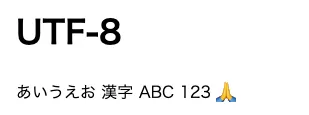
As expected, when the charset and the encoding match, it seemed to decode correctly.
② charset is shift_jis, body encoded in utf-8

On the other hand, when the charset and the encoding don't match, the text turns into mojibake.
③ charset is shift_jis, body also encoded in shift_jis
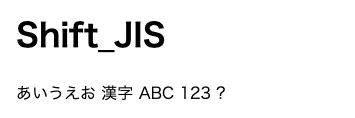
When encoded in shift_jis, it decodes fine, but only "🙏" became "?". This is because shift_jis has no range that can represent Unicode emoji, so it already failed at the encoding step. ② is mojibake caused by "reading (decoding) it the wrong way", while ③ is a different problem: "characters that Shift_JIS cannot represent in the first place are lost at conversion time (irreversibly)".
I sorted out the concepts of character encoding and how mojibake happens in the browser. I hope this helps you figure out which layer the mismatch is in the next time you run into mojibake.
Translated from the Japanese original.
Thanks. I'll look into it.
Sorry, that didn't go through. Please try again later.