Understanding What Goes into a GitHub Actions Workflow
Contents
When you join a project whose environment is already fairly set up, I think you can end up in a state like this:
"When I open a PR on GitHub, some tests and checks run automatically, but honestly I don't really understand them..."
What it looks like (https://github.com/microsoft/vscode )
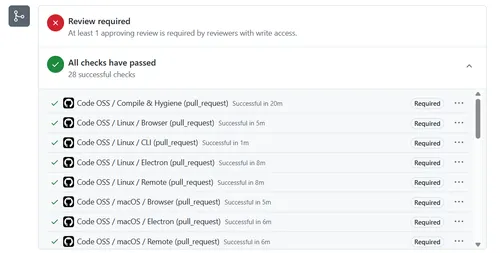
In this post, using a minimal workflow as the example, I organize:
- "which files" GitHub Actions runs and "in what order"
- points to look at when reading an existing workflow.yml from top to bottom
- parts that are fine to change and parts to handle carefully
Only YAML files (.yml / .yaml) placed under .github/workflows/ at the repository root are recognized as workflows.
.github/workflows/*.yml
Note
In a monorepo, a yml file created under each project's folder is not recognized.
A GitHub Actions workflow definition file has a hierarchy like this.
- workflow (the whole file)
- trigger (on)
- shared settings (env / concurrency, etc.)
- jobs
- job
- job settings
- steps
- step
- job
This post explains the file below from top to bottom, in order of the hierarchy.
name: CI

run-name: Run #${{ github.run_number }} by ${{ github.actor }}

on:
  push:
    branches: [main]
  pull_request:

env:
  NODE_ENV: test

concurrency:
  group: ${{ github.workflow }}-${{ github.ref }}
  cancel-in-progress: true

jobs:
  typecheck:
    runs-on: ubuntu-latest
    steps:
      - uses: actions/checkout@v4
      - uses: actions/setup-node@v4
        with:
          node-version: 20
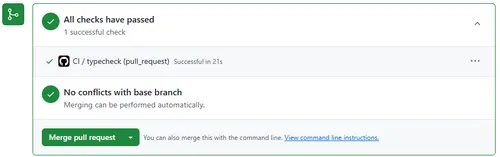
- run: npm ci name: CI- The name shown in the GitHub Actions UI
- The name defined here is shown, not the file name of the yml file
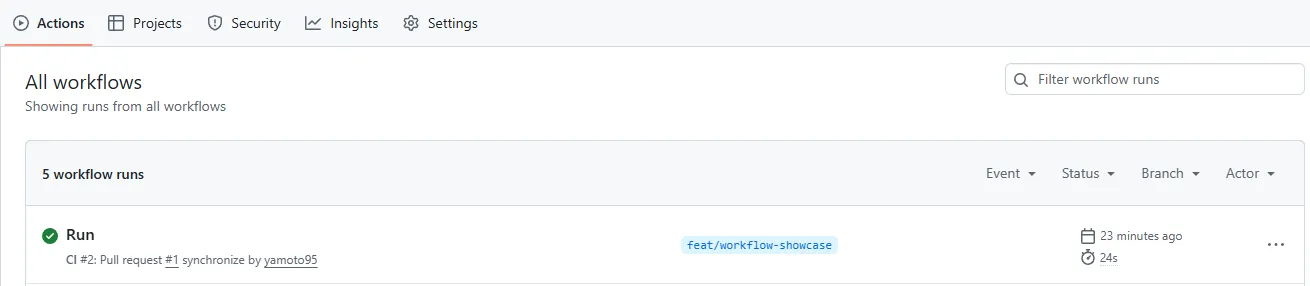
run-name: Run- The display name of a GitHub Actions "workflow run" (one run)
- It is shown as the title in places like the Actions tab
on:
  push:
    branches: [main]
pull_request: - Defines when this workflow runs
- push:branches: [main] → runs when something is pushed to the main branch
- pull_request → runs when a PR is created or updated
The events you can use are listed here. https://docs.github.com/en/actions/reference/workflows-and-actions/events-that-trigger-workflows
env:
NODE_ENV: test- Defines environment variables you can use in a GitHub Actions workflow/job/step
- Specified in the form
key:value
concurrency:
  group: ${{ github.workflow }}-${{ github.ref }}
cancel-in-progress: true- Controls workflows / jobs with the same
concurrency.grouprunning at the same time
jobs:
  typecheck:
    runs-on: ubuntu-latest
    steps:
      - uses: actions/checkout@v4
      - uses: actions/setup-node@v4
        with:
          node-version: 20
- run: npm ci- The unit of execution in GitHub Actions
- Jobs run in parallel by default
- Each job runs on its own independent runner (execution environment)
typecheckis the name of the job
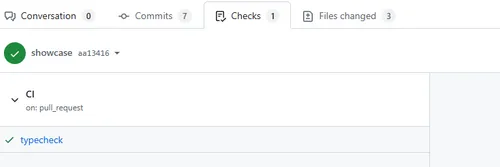
- The items you can define in a job are listed here. https://docs.github.com/en/actions/reference/workflows-and-actions/workflow-syntax#jobs
runs-on: ubuntu-latest- Defines the runner (execution environment) the job runs on
steps:
      - uses: actions/checkout@v4
      - uses: actions/setup-node@v4
        with:
          node-version: 20
- run: npm ci- Steps run in series by default
uses- Used to call an existing "Action" (a building block)
- Common operations such as checkout are defined as ready-made Actions you can use
- The execution environment depends on how the Action is implemented
run- Used to run commands in a shell
- Runs as shell commands on the runner specified for the job
In this post, I read through a GitHub Actions workflow.yml from top to bottom, based on a minimal setup you often see in real work.
There are many other items you can define, so take a look at the page below. https://docs.github.com/en/actions/reference/workflows-and-actions/workflow-syntax
Translated from the Japanese original.
Thanks. I'll look into it.
Sorry, that didn't go through. Please try again later.